
Employee Group Management in Frappe HRMS
Creating Custom Employee Classifications
Overview
The Employee Group feature in Frappe HRMS is a versatile tool designed for HR professionals in UAE-based companies including small and mid-sized companies. It enables organizations to create tailored employee groupings based on attributes like Designation, Grade, Branch, or other custom criteria. This functionality streamlines workforce management and enhances service delivery, making it an ideal software solution for efficient HR operations. It is one of the many powerful tools available through the HRMS Dubai platform.
Why Employee Groups Matter for UAE Businesses
In the UAE, companies often need to manage employees in ways that go beyond the standard department or branch structure. For example, a company might need to group all employees eligible for a specific training programme, all workers assigned to a particular project site, or all staff members covered under the same health insurance plan. Employee Groups provide the flexibility to create these custom classifications without changing the underlying organizational structure.
This capability is especially valuable for UAE companies managing diverse, multinational workforces. You might need to create groups based on visa type, language proficiency, or eligibility for Emiratisation programmes. Employee Groups allow you to organize your workforce in any way that makes sense for your business operations, compliance reporting, or internal communications.
Prerequisites
Before creating an Employee Group in Frappe HRMS Employee Group, ensure you have:
- Employee records set up in the system
- A clear idea of the grouping criteria you want to use (e.g., by project, by skill, by location)
Creating an Employee Group
Access Path
Navigate to: Home > Human Resources > Employee > Employee Group
Setup Process
- Access the Employee Group list
- Click on “New”
- Enter Group name (e.g., “Dubai Expo Project Team,” “WPS Group A,” or “Safety Training Batch 3”)
- Add Employee IDs to the group
- Employee names are automatically populated from the employee master records
- Save the record
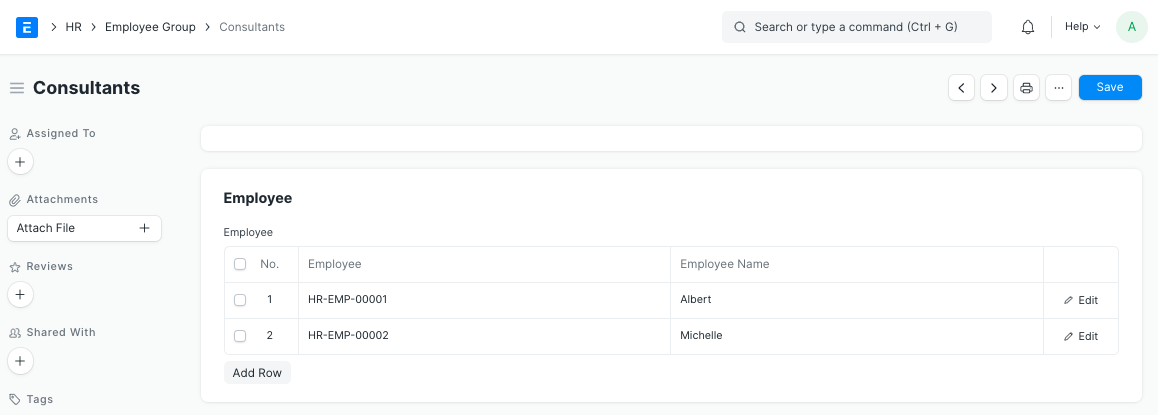
You can create as many groups as needed, and a single employee can belong to multiple groups simultaneously. This flexibility is key for UAE organizations that need to slice their workforce data in different ways for different purposes.
Key Features
Service Level Agreement Integration
- Link Employee Groups to Service Level Agreements for measurable service standards
- Define specific service levels for different groups based on their function
- Streamline service delivery management across departments and branches
- Monitor service performance by group with built-in tracking
Cross-Functional Grouping
Employee Groups are not limited to a single department or branch. You can create groups that span the entire organization, which is particularly useful for:
- Cross-departmental project teams working on company-wide initiatives
- Safety committee members drawn from multiple branches
- Employees at the same grade level across different departments
- Teams assembled for special events, seasonal campaigns, or temporary assignments
Practical Applications for UAE Companies
- Service delivery management -- assign groups of employees to client-facing SLAs and track performance
- Team-based assignments -- create project-specific teams for construction sites, event management, or consulting engagements
- Group-specific policies -- apply targeted policies such as remote work eligibility or overtime rules to specific groups
- Targeted communications -- send announcements, training invitations, or policy updates to a defined group rather than the entire company
- Resource allocation -- plan staffing for upcoming projects by reviewing the composition and availability of each group
- Compliance reporting -- generate reports on specific employee segments for MOHRE submissions, Emiratisation tracking, or WPS audits
Benefits
- Flexible employee categorization that adapts to your business needs
- Simplified group-based management without altering your organizational chart
- Enhanced service level tracking with SLA integration
- Efficient team organization for project-based or event-based work
- Streamlined communication targeted at the right people
Best Practices
- Name groups descriptively -- use names that clearly indicate the purpose of the group, such as “Q1 Training Cohort” or “Abu Dhabi Site Workers.”
- Review group membership regularly -- employees join and leave projects, so keep group rosters up to date.
- Combine with other HR features -- use groups alongside employment types and designations for comprehensive workforce segmentation.
- Leverage for onboarding -- create onboarding groups for new hire batches to streamline the orientation process.
Related Resources
- HRMS Dubai: Complete Guide to HR Management -- explore the full HRMS Dubai platform
- Employee Management in Frappe HRMS -- set up the employee records that feed into groups
- Employment Types in Frappe HRMS -- classify employees by employment type before grouping
- Designation Management in Frappe HRMS -- use designations as a basis for employee groupings
- Employee Health Insurance Management in Frappe HRMS -- group employees by insurance plan
- Explore All Frappe HRMS Features
Ready to streamline your HR with a clear organizational chart? Discover how Frappe HRMS’s Employee Master module can transform your employee management. Book a free demo today!