

Organizational Chart in Frappe HRMS
Visualizing Company Structure
Overview
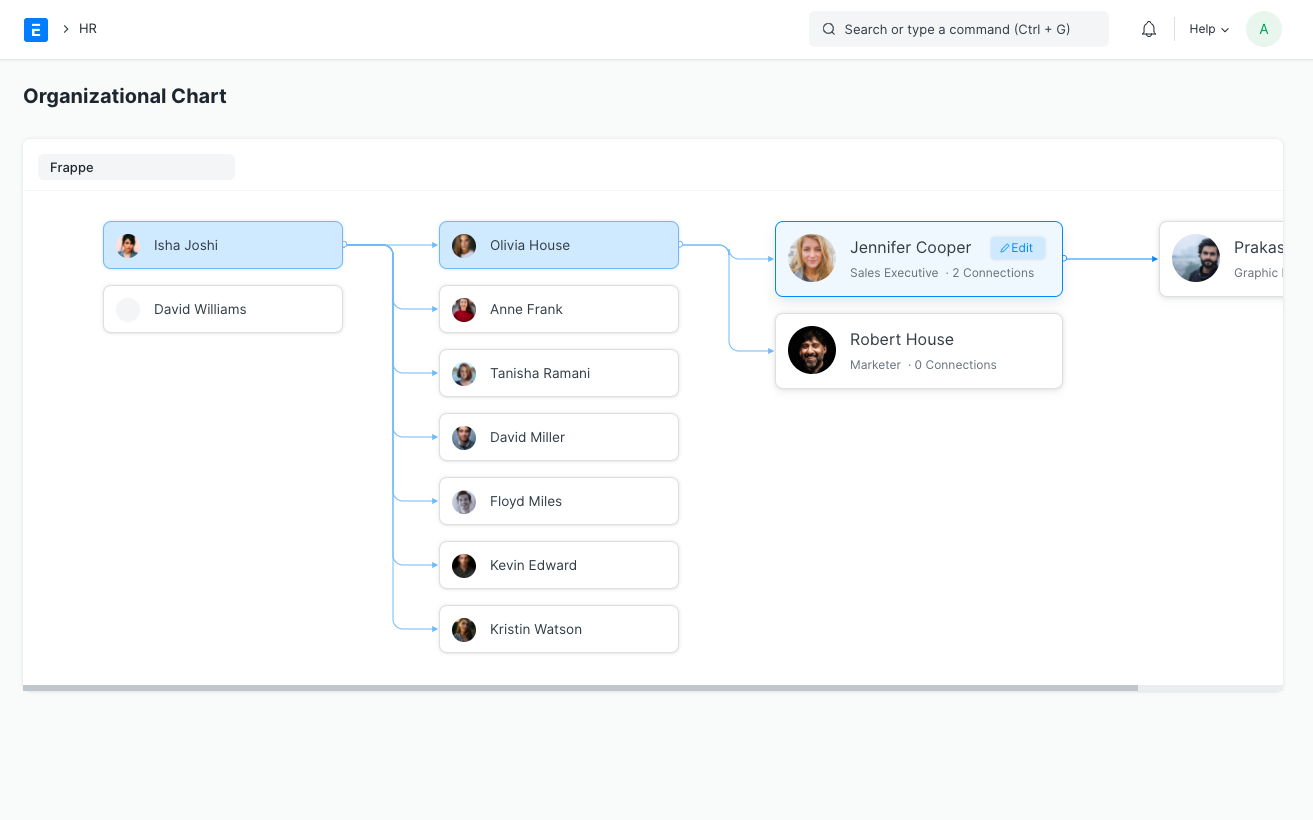
The Organizational Chart feature in Frappe HRMS provides a dynamic visual representation of your company’s hierarchical structure. This interactive tool helps employees understand reporting relationships and organizational hierarchy through an intuitive interface that displays employee information, including names, designations, and profile images. It is one of the most valuable features of the HRMS Dubai platform for companies looking to maintain clarity in their workforce structure.
Why an Organizational Chart Is Essential for UAE Companies
UAE businesses are characterized by rapid growth, diverse workforces, and multi-location operations. As companies scale from a handful of employees to hundreds or even thousands across multiple branches and emirates, maintaining a clear understanding of who reports to whom becomes increasingly difficult. An organizational chart eliminates this confusion by providing a single, always-up-to-date view of the entire company hierarchy.
For new employees joining a UAE company, the organizational chart is an invaluable onboarding tool. In a multicultural workplace where teams may include colleagues from dozens of nationalities, understanding the reporting structure helps new hires navigate the organization quickly. It also supports compliance efforts, as free zone authorities and government bodies sometimes request proof of organizational structure during licensing or audit processes.
Accessing the Organizational Chart
Navigate to: Home > Human Resources > Employee > Organizational Chart
Key Features
Hierarchy Visualization
- Based on “Reports To” relationships from Employee records
- Top-level employees (with no reporting manager) appear at the first level
- Clear visualization of reporting structures and team relationships
- Supports complex hierarchies typical of large UAE enterprises with regional managers, country heads, and emirate-level supervisors
Responsive Design
- Horizontal expansion on desktop views for comprehensive hierarchy browsing
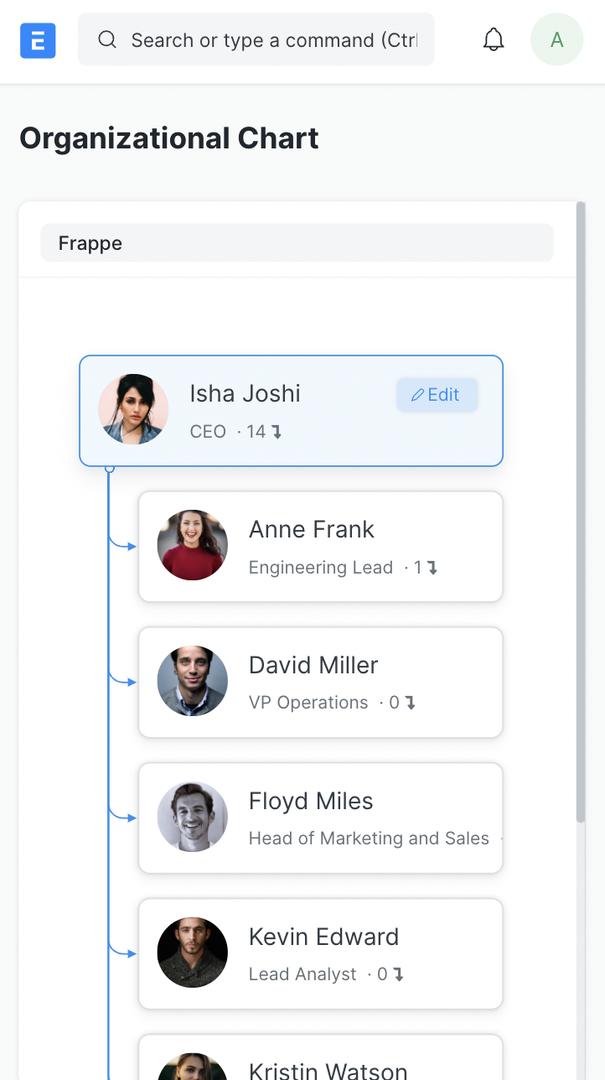
- Vertical expansion on mobile devices for on-the-go access
- Adaptive layout for optimal viewing on any device, perfect for managers reviewing their teams from a tablet on-site
Node Information Display
Each node in the chart shows:
- Employee name
- Profile image
- Designation (e.g., “Senior Project Manager,” “HR Director”)
- Total number of connections (descendants), giving a quick sense of team size
Interactive Features
- Direct link to Employee Master through edit button for quick updates
- Highlighted active hierarchy during navigation to trace reporting lines
- Company filter for multi-company organizations, useful for UAE groups operating multiple entities
- Connection count showing total downstream reports at every level
Connection Tracking
- Visual representation of reporting lines across departments and branches
- Clear indication of team sizes at every level of the hierarchy
- Easy identification of organizational depth, from C-suite to front-line staff
How UAE Companies Use the Organizational Chart
Workforce Planning and Restructuring
When UAE companies undergo restructuring, whether due to market changes, mergers, or expansion into new emirates, the organizational chart provides the baseline for planning. HR managers can identify reporting gaps, overstaffed teams, or departments that need new leadership. This visual approach is far more effective than reviewing flat spreadsheets of employee data.
Emiratisation Reporting
Companies subject to Emiratisation requirements can use the organizational chart alongside employee grade data to demonstrate how UAE nationals are positioned within the hierarchy. This helps show that nationals are being placed in meaningful roles with clear career progression, rather than in token positions.
Multi-Company Groups
Many UAE business groups operate several legal entities under a single umbrella -- for example, a holding company with subsidiaries in trading, real estate, and hospitality. The company filter in the organizational chart allows group-level HR teams to switch between entities and view each one’s structure independently.
Practical Applications
- Quick organization structure reference for leadership meetings
- New employee orientation to help hires understand the company structure
- Team planning and restructuring during growth phases
- Communication flow visualization to identify bottlenecks
- Resource allocation planning across branches and departments
Benefits
- Improved organizational clarity that reduces confusion in large, distributed teams
- Enhanced communication efficiency by making reporting lines visible
- Better team collaboration when employees know who to escalate to
- Simplified hierarchy understanding for employees at every level
- Easy access to employee information through clickable nodes
- Support for compliance and audit requirements with a clear structural overview
Related Resources
- HRMS Dubai: Complete Guide to HR Management -- the complete guide to HRMS for Dubai businesses
- Employee Grade Management in Frappe HRMS -- define the grade levels visible in your org chart
- Department Management in Frappe HRMS -- set up the departments that shape your hierarchy
- Designation Management in Frappe HRMS -- the designations displayed on each org chart node
- Branch Management in Frappe HRMS -- see how branches fit into your overall org chart
- Explore All Frappe HRMS Features
Ready to streamline your HR with a clear organizational chart? Discover how Frappe HRMS’s Employee Master module can transform your employee management. Book a free demo today!